A log of every run. Open any run to see the status code, the response body and how long it took. Each retry gets its own entry.
How runs are recorded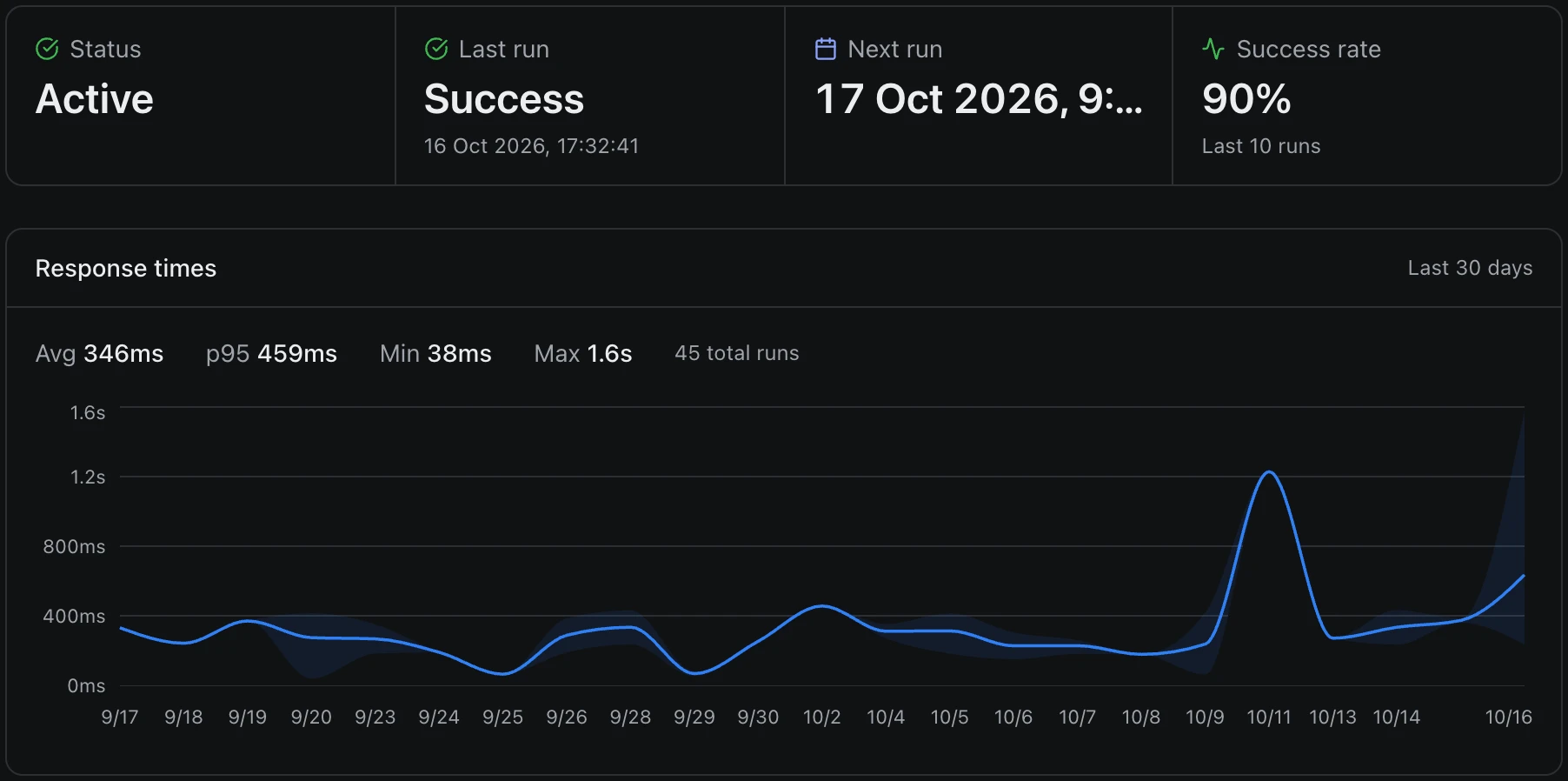
Give Delay a URL and a cron expression, or call the API to run a request later. Delay sends it on time, saves the response and tells you in Slack, Discord or email when a job keeps failing.
POST a URL and a queue name to run it now or up to a day later. Send a cron expression instead and it repeats. There's no SDK: use curl, or the HTTP client your app already has.
1# Send a POST request right now
2curl -X POST https://app.delay.run/api/jobs \
3  -H "Authorization: Bearer $TOKEN" \
4  -H "Content-Type: application/json" \
5  -d '{
6    "queue": "emails",
7    "url": "https://api.yourapp.com/send",
8    "payload": { "to": "[email protected]" }
9 }'1# Run a health check every 5 minutes
2curl -X POST https://app.delay.run/api/crons \
3 -H "Authorization: Bearer $TOKEN" \
4 -H "Content-Type: application/json" \
5 -d '{
6 "name": "Health Check",
7 "url": "https://api.yourapp.com/health",
8 "cron_expression": "*/5 * * * *",
9 "method": "GET"
10 }'1# Send a review request in 24 hours (the longest delay)
2curl -X POST https://app.delay.run/api/jobs \
3 -H "Authorization: Bearer $TOKEN" \
4 -H "Content-Type: application/json" \
5 -d '{
6 "queue": "reviews",
7 "url": "https://api.yourapp.com/review",
8 "delay": 86400,
9 "payload": { "order": "ORD-2847" }
10 }'1# Charge, then call us back with the result
2curl -X POST https://app.delay.run/api/jobs \
3 -H "Authorization: Bearer $TOKEN" \
4 -H "Content-Type: application/json" \
5 -d '{
6 "queue": "payments",
7 "url": "https://api.yourapp.com/charge",
8 "payload": { "amount": 2999 },
9 "callback_url": "https://yourapp.com/hook"
10 }'One-off and delayed jobs go to /api/jobs. Recurring schedules go to /api/crons.
Delay stores each run with the request it sent and the response it got back. Failed jobs retry on their own, and the ones that never succeed are kept until you replay them.
A log of every run. Open any run to see the status code, the response body and how long it took. Each retry gets its own entry.
How runs are recorded
Retries on delays you choose. Each queue has its own list of retry delays. Out of the box a failed job tries again after 1 minute, then 30 minutes, then 3 hours.
Retry strategy
A dead letter queue. Jobs that run out of retries wait here with their last request and response. Fix the bug, then replay one job or the whole batch.
The dead letter queue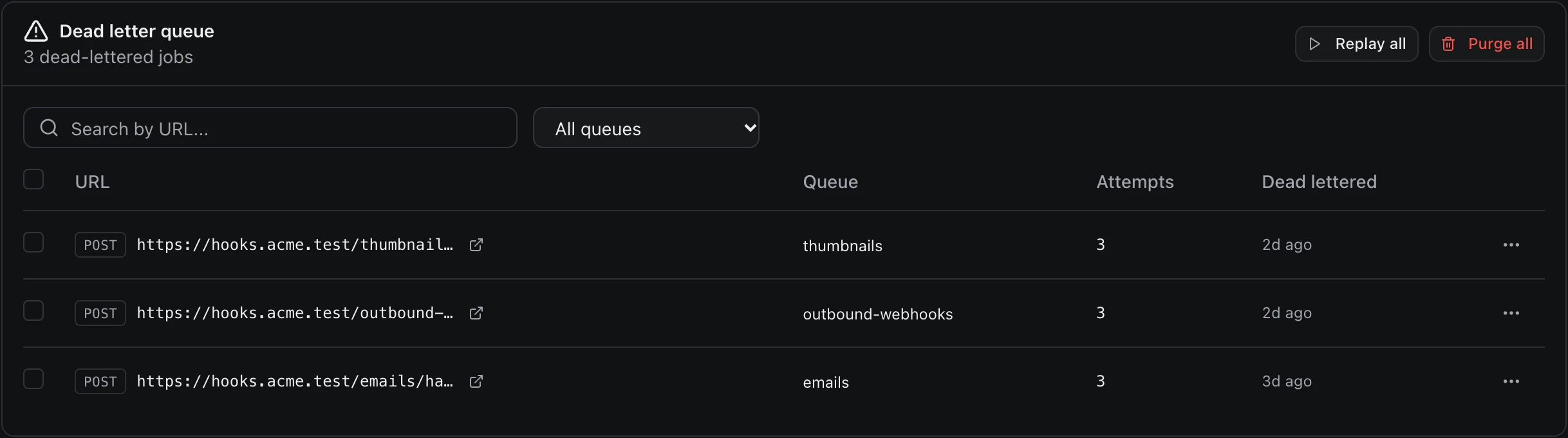
Every minute
is as often as a cron can run. Standard five-field syntax, in UTC.
2 years
of run history on Enterprise, request and response included
Pick the channel once for your team. Delay posts there when a job keeps failing, and again once it recovers.
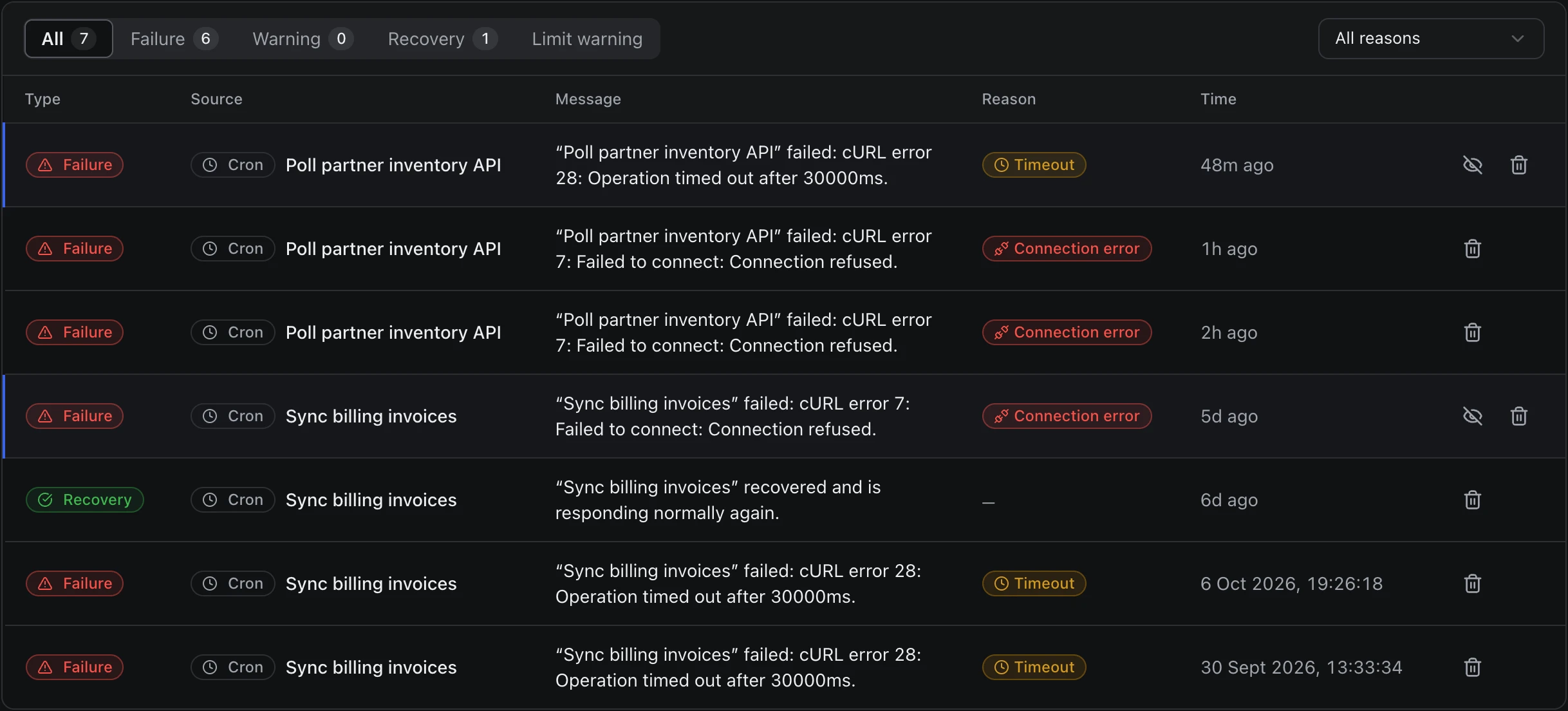
Poll partner inventory API failed 3 consecutive runs
Connection refused View run
Poll partner inventory API recovered
200 OK, working again
Sooner or later every team running cron writes these. Delay comes with them.
Check more than the status code. A 200 that says "degraded" is still a problem. Check a JSON path, the body text or the response time too, and a failed check counts as a failed run.
Success assertions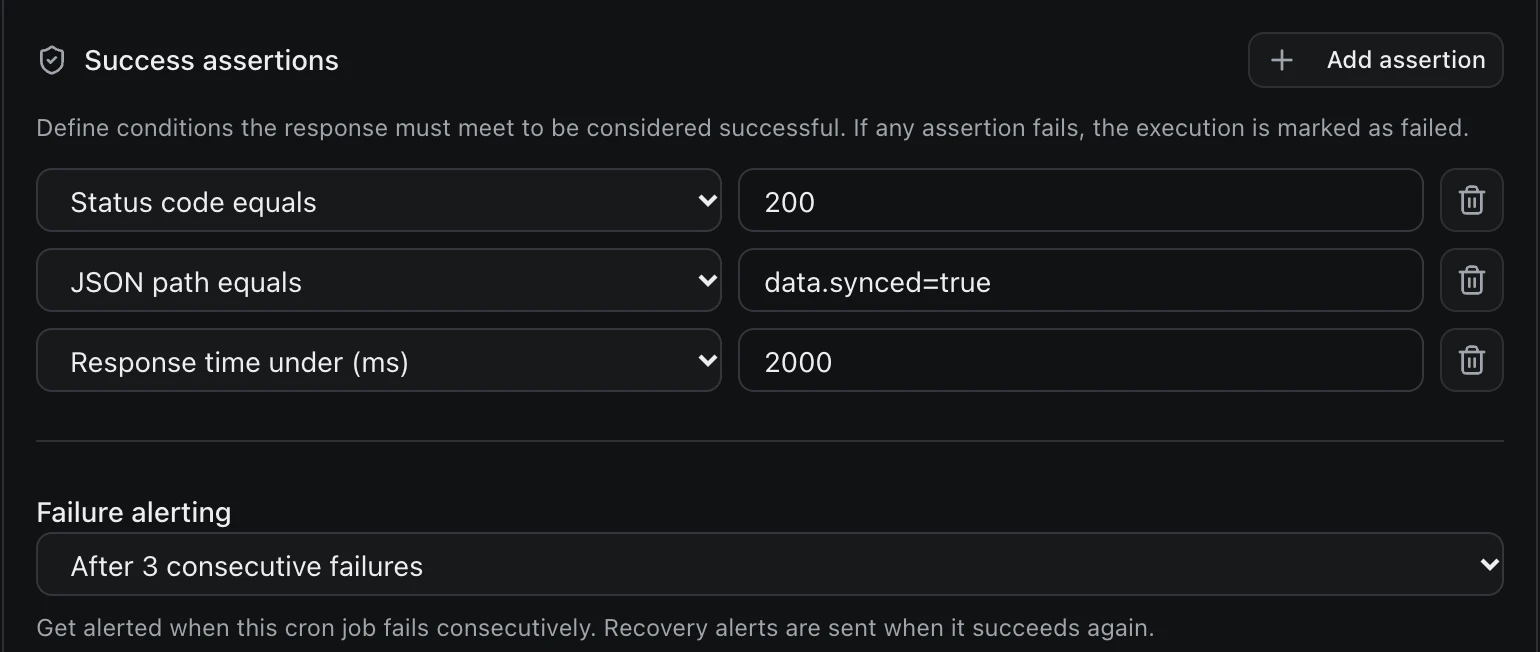
Maintenance windows. Mute alerts for one cron, one queue or the whole team while you deploy. Jobs keep running, and alerts come back when the window closes.
Maintenance windows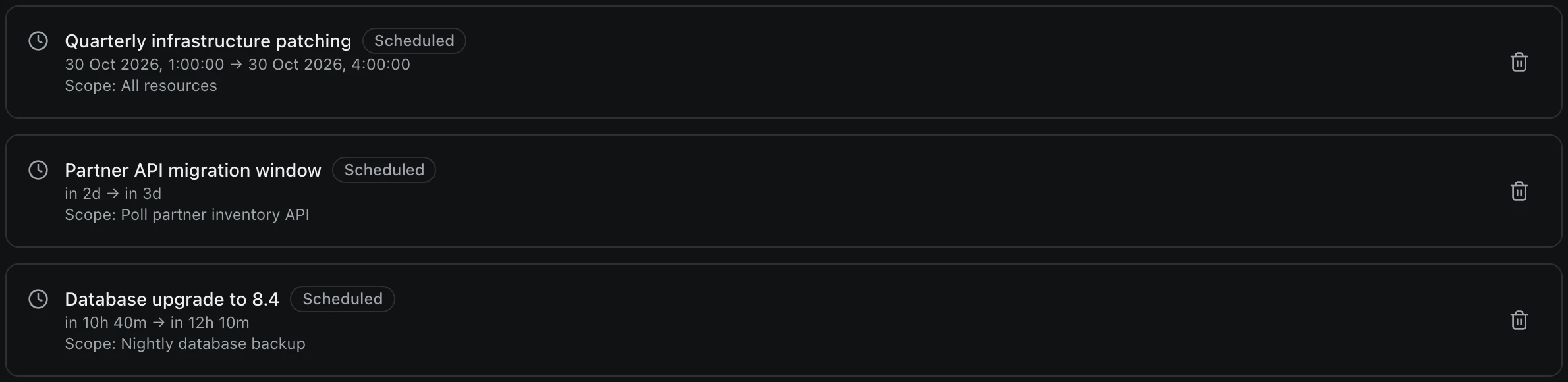
Signed requests. Turn on signing and each request carries an HMAC-SHA256 signature and a timestamp, so your endpoint can turn away anything that didn't come from Delay.
Webhook signing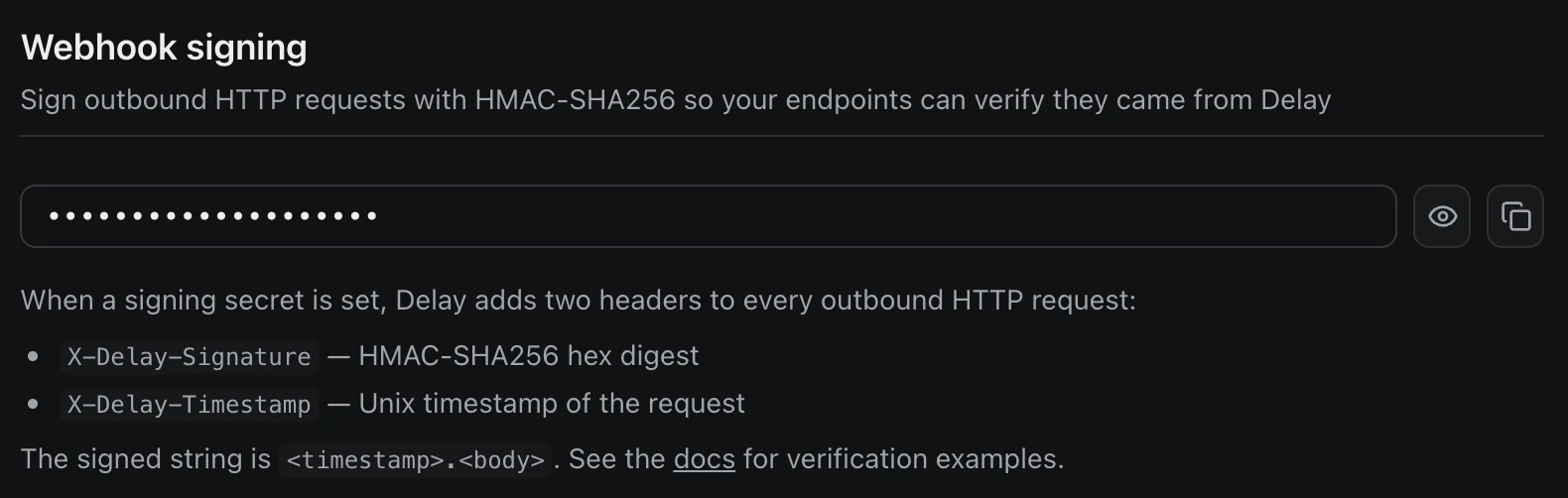
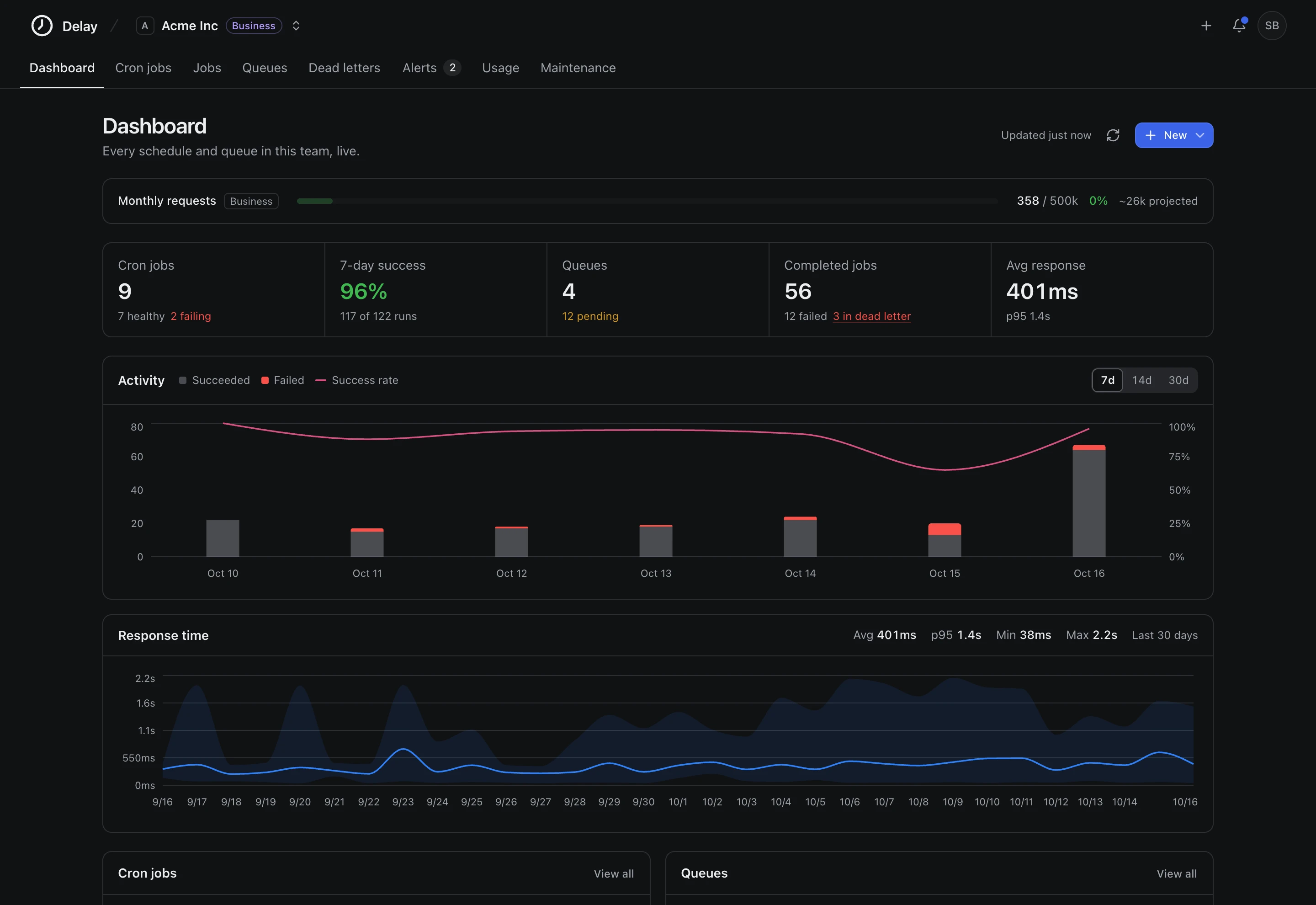
Monthly usage. Cron runs and job runs share one monthly quota. The chart shows every day so far and where the month is heading.
Compare plans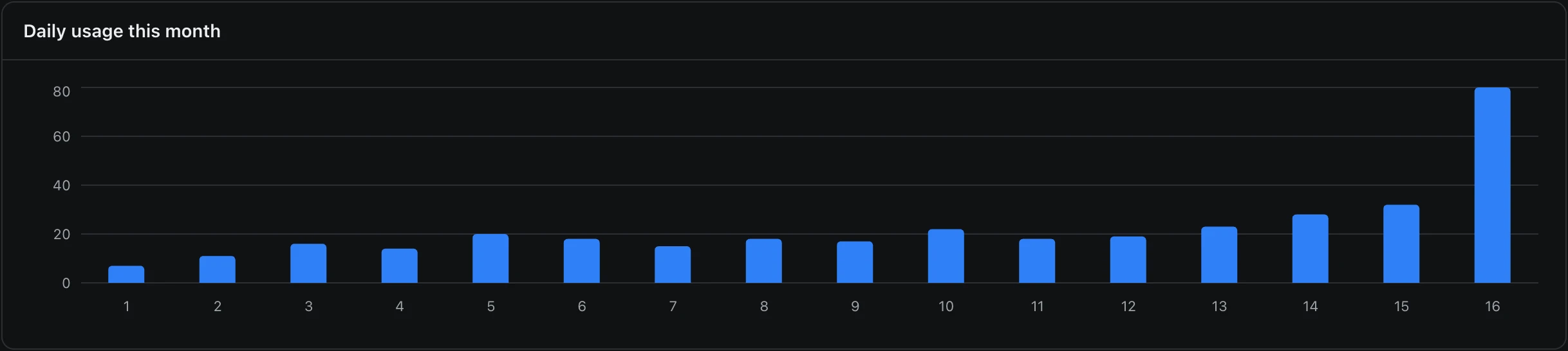
Plain HTTP
Laravel, Rails, Django, Express, Go or a Cloudflare Worker. If it answers HTTP, Delay can call it.
0 3 * * *
POST /backups/nightly
Nightly backups & cleanup. Kick off the 3am backup and the session purge, and keep proof that both ran.
0 5 * * 1-5
POST /reports/sales-digest
Digests & reports. Build the weekday sales digest at 5am and have it in inboxes before anyone logs on.
* * * * *
GET /healthz
Health checks. Call your health endpoint every minute. Set the alert threshold to one and the first 5xx reaches you.
30 1 * * *
POST /sync/upstream
Data syncs & ETL. Pull from upstream APIs every night. A response check catches the run that returns 200 with nothing in it.
0 9 * * *
POST /billing/dunning
Billing & dunning. Run the failed-payment pass and trial reminders every morning, and hear about it the same day if they stop.
*/15 * * * *
GET /poll/shopify-orders
Poll APIs without webhooks. Some services won't push the events you need. Poll them every 15 minutes instead.
Cronitor and Healthchecks watch cron jobs that still run on your servers. cron-job.org and EasyCron call a URL but keep little history. Inngest and Trigger.dev run workflows through an SDK in your code.
| What you get | Delay Runs, retries and alerts | Cron monitors Cronitor, Healthchecks | Basic schedulers cron-job.org, EasyCron | Workflow SDKs Inngest, Trigger.dev |
|---|---|---|---|---|
| Runs your scheduled HTTP jobs | Yes | No | Yes | Yes |
| Automatic retries | Yes | No | Limited | Yes |
| Failure + recovery alerts | Yes | Yes | Basic | Yes |
| Full request/response history | Yes | No | Limited | Yes |
| Shared team dashboard | Yes | Paid tiers | No | Yes |
| Works from any language over plain HTTP | Yes | Yes | Yes | No |
| Nothing to host or maintain | Yes | Your cron still runs somewhere | Yes | Varies |
Pick a cron monitor when you want to keep running cron on your own servers and only need to hear when a check-in goes missing.
Pick a workflow SDK when you need durable, multi-step TypeScript workflows and are happy to add an SDK to your codebase.
Pick Delay when you want the schedule, retries, run history and alerts in one place, over plain HTTP.
I built Delay because cron on my own servers kept failing without telling anyone. A backup job stopped running on a Saturday, and I found out from a bug report on Monday. A crontab that stops gives you no output and no error. Delay runs the job, keeps the result, and tells you when it fails.
Suleyman
Founder of Delay
Why Delay existsYou pay for requests. Crons, queues, teams and seats are unlimited on every plan.
Free for 1,000 requests a month. Every feature is included, and you don't need a credit card.
For individuals and side projects.
20,000 requests / mo
Get startedFor small teams in production.
75,000 requests / mo
Get startedFor apps with heavy traffic.
500,000 requests / mo
Get startedFor large volumes and long history.
5,000,000 requests / mo
Get startedWhat counts as a request? Every cron run and every job attempt, counted together against one monthly limit.
Close to the limit? You get a warning before you reach it. At the limit, runs pause until the next month starts or you upgrade.
Need a custom volume? Tell us roughly what you run and we'll put a plan together.
[email protected]A hosted cron job service. You give it a URL, a method, optional headers and a schedule. Delay makes the request on time, keeps the response and alerts you when it keeps failing. You write the code that does the work, and Delay makes sure it gets called.
You can, and plenty of teams do until the server is replaced, the crontab doesn't come along, and nobody notices for a week. Cron on a server gives you no run history and no alerts. With Delay there's no machine to keep alive, and every run is recorded.
Usually not. If your app has a route that does the work, point Delay at it. To make sure only Delay can call that route, turn on request signing and check the signature header.
Jobs sent through the API retry on the delays set for their queue, and go to the dead letter queue when the retries run out. Crons do not retry: the next scheduled run is the retry. A cron alerts after the number of failures in a row you choose, and again when it recovers.
Yes. POST the URL, method, headers and payload to /api/jobs and the request goes out right away, or after a delay of up to 24 hours. Add a callback URL if you want the result posted back to you.
The one you pick. Each cron has its own time zone, UTC unless you choose another, and daylight saving is handled for you, so 0 9 * * 1-5 in Europe/Berlin runs at 09:00 Berlin time all year.
If your app can answer an HTTP request, yes. That covers Laravel, Rails, Django, Express and Go, and serverless functions on Vercel, Netlify or Cloudflare Workers.
Cronitor and Healthchecks are cron monitors. Your server still runs the job and pings them, and they alert you when the ping doesn't arrive. Delay runs the schedule itself, so there's no server left to watch.
They call a URL on a schedule, which is the part Delay has in common with them. Delay also keeps each request and response, retries failed jobs, has a dead letter queue, and gives your whole team one dashboard.
Yes. The free plan includes 1,000 requests a month and every feature. No credit card needed.
Each cron run and each job attempt, retries included, counted together against one monthly limit. Crons, queues, teams and seats are unlimited on every plan.
Your team gets a warning alert on the way there. At the limit, runs pause until the next calendar month or until you upgrade.